Showing posts with label ebook reader. Show all posts

Thursday, April 13, 2017

E-Reader Series: If I Had to Do It Again, Would I Get an eBook Reader over a Tablet?


This is what I've been thinking about the last few weeks and it's a hard question to answer. Overall, I really do love my Kindle Touch. Still, I wonder if I should have waited. Here are some reasons that I would consider getting a tablet instead of the Touch:

Why a Tablet Is Better Than an E-Reader

  • More versatile. Tablets are made for more than just reading books. You can play apps, music and video on them. There are dozens of apps for tablets whereas the Touch is made just for reading ebooks and nothing else.
  • Operating system. Operating systems on tablets are made to be fast and easy to use.
  • Graphics. You can see the covers of books as you're going through them to figure out what you want to read.
  • Same size. Now that 7-inch tablets are all the rage, you can get awesome tablets that can also be held on one hand. This makes reading in bed easy. The release of the iPad caused a slew of copycat tablets that were all about 10 inches. Now that the 7-inch tablet has caught, in part spurred by the Amazon Fire tablet, there are many choices for smaller tablets that can be held in one hand.
  • Battery life. Maybe batteries on the tablets won't last a month, but many are made to last 10 hours of active use and up to a couple weeks on standby. This means at the very least, it should last all day and you can then charge it while you sleep so it's ready for the next day.
  • Kindle app. No matter what tablet you get, whether it's Android, Windows RT or iOS, there's an app that allows you to access your Kindle library. This means that you can read your ebooks on lots of devices rather than being stuck with only reading on your Kindle. 
  • Read non-Amazon ebooks. Not only that, but on tablets you can get apps for other e-readers, such as Nook, so that ebooks that you've bought through other sources can also be read on your tablet. With a Touch (as well as other Kindle devices), you're limited to only purchased made through Amazon.

Why an E-Reader Is Better Than a Tablet

So you're probably wondering, if a tablet is so much better, why should I even consider an e-reader? Well here are some thoughts about that:
  • Eye strain. It's possible that reading on a tablet may cause more eye strain than an e-ink reader like the Touch. However, if you have problems with eye strain, the recommendation is that every 20 minutes, focus on something 20 feet away for 20 seconds. I know that from my experience, I have not had any problems reading on the Touch any more so than reading a book.
  • Doesn't work in bright light. So a few years ago, I was working from home on my laptop and I got this bright idea that I would take Alex, who was a toddler then, outside of our four-plex to play on the grass. I would take my laptop so I could get some work done and still keep an eye on him. Well, that worked not at all because the light from the sun completely washed out my laptop screen and I couldn't read a thing. For this reason, the e-ink display wins. If you want to read at the beach, at the park, or anywhere else outside, a tablet just won't do.
  • Cost. When it comes to price points, nothing beats a Touch. With the Kindle Touch now only $89, there's really no reason to say no. And despite the fact that I was so excited when the Paperwhite came out (and it was only $40 more than what I paid), honestly I don't think it's essential to have one instead of the Touch (unless you think you'll be reading in dark or very low light a lot). I can't think of an instance where I haven't had enough light from a lamp, an overhead light, or the sun to read just fine.

What Should You Get Then? A Tablet or an E-Reader?

That is a question you'll to answer yourself, but I think the major factor that comes into play is the price. For only $69, you can have your own e-ink reader, so if you can't shell out $200 or more for a tablet, why not get a Touch. 

However, if you can afford a tablet, and especially if you want to do more on than just read ebooks (such as using apps and watching Netflix or movies and TV shows), I would definitely recommend a tablet. There are so many to choose from and they all have their benefits, so it will take some research to decide which one is right for you.

And really, if you can swing it, I'd get one of each. There will be times when one or the other will work better  for that situation. You could keep the Kindle in your purse ready to read if you ever need something to pass the time (without worrying about the battery being dead) and bring the tablet with you when you're going on a long trip and need to keep your kids occupied. For that matter have both with you so your kids can play games while you're reading a book—everyone wins!

So do I regret getting the Touch? No, not at all. Whether or not I get a tablet in the future, I will continue to read books on my Touch. Overall, I love it.

Do you have an e-reader or tablet? If so which one do you have and do you love it?

Friday, March 29, 2013

7 Reasons Why You Should Be Reading E-Books


So hopefully, I haven't totally confused you with whether or not you should get an e-reader, but I wanted to talk about whether I recommend e-readers in general. I don't know if I recommend an e-book reader per se (it really depends on your situation and your preferences), but I definitely recommend e-books. 

Whether you read them on an ebook reader or on a tablet using an app, I do recommend you getting into the world of electronic books. Here's why:

E-books are often cheaper

First I'd like to say that people seem to have a misconception and believe that e-books should be dirt cheap or they should be free just because you're not buying a physical product. Understand though that the cost of printing and shipping a book is only a small fraction of the cost of producing a book. That said, e-books do tend to be cheaper, especially if the book has been out for a year or more. Once the cost of producing a book has been covered, publishers have more leeway in offering a discount on e-books since they can produce an infinite amount without costing more.

Not only that, but you don't have to pay to have the book shipped and books are instantly delivered to your e-reader or other device, so no waiting for it to reach you. You want to read a new book, you can within seconds.

E-books don't take up space

This last summer I moved two states away and let me tell you, I got rid of a lot of books. You can't sell used books very easily (unless they're expensive, up-to-date text books). I had a bunch at my yard sale and I probably sold five of them, mostly kids' books. They're heavy and once you've read them, you might not read them ever again (or you might read them only every 5 years and in the meantime they're taking up space). E-books on the other hand take up no space, you can have as many as you want (especially with cloud storage) and they weigh nothing.

You can borrow e-books from libraries

Libraries are starting to have e-books as part of their inventory. To borrow one, you just have to have a membership to that library. You don't have to go to the library to get a book; you just need an internet connection. Just like with the regular books, you may have to wait in line till a book is available and the selection may be limited, but there are no worries about losing the book or forgetting to return it and paying a late fee. You also don't have to worry about paying for a new book after your toddler decided to turn it into an art project. 

You can borrow e-books from friends

Just like with regular books, you can borrow books from friends. Unfortunately, there are some restrictions. You can only borrow each book one time. Book lending periods are for 14 days, so only borrow a book when you know you want to read it. Publishers of the book also have to have the option of lending enabled, so not all books are able to be lent. Still, it's a great way to read a book your friend recommended to you, and you don't have to worry about forgetting to return it!

You can read ebooks on any device from practically anywhere

Did you know that you can get a program that allows you to read Amazon e-books from your computer? Yep, you can read them right on your desktop ... no e-reader required. There are apps for every mobile and tablet OS (as far as I'm aware) as well as Kindle. Not only that, but if you start reading a book on one device and then switch to another device, the Kindle app will remember where you left off and you can pick up from there on the next device (assuming you're connected to the Internet while you're reading, that is). You can go from reading on your computer to reading on your phone to reading on your table to reading on your e-reader. This makes it great if you were reading on your Kindle at home and then got stuck somewhere without it because you can just continue on your smart phone. Genius!

You can take the reader with you wherever you go

And unlike with real books, you don't have to worry about them being too heavy. By having your e-reader in your purse, you will always have something to do if you find yourself waiting for your car's oil to be changed or waiting at a doctor's office for an appointment.
This shows some of the books I'm borrowing along with The Da Vinci Code I got for free :)

You can get books for free

Despite what I said about how you shouldn't expect to get books for the fraction of the cost, books are still available for free. Typically, these books are ones by self-published authors who are looking to gain a readership, but that's not always the case. Another reason a book might be free is that it's the first book in the series and the publisher is trying to get more readers interested in the other books, and therefore buy them. I've even got big named books for free like The Da Vinci Code and Must Love Dogs. These books are typically not free for long, though, so check back to Amazon often to see what the deals are that day.
    So whether or not you've owned an e-reader in the past, dive into the world. If you don't have a lot to spend, start small with a Kindle Touch or something equivalent. For only $69, you really can't go wrong.
    *Hot* Insider's Tip


    Want an insider's tip. I know how you can keep a library e-book rental (or other rental for that matter whether you're borrowing a book from a friend or from Amazon) longer than the due date. Typically on the due date, the book will automatically be removed from your e-reader and you won't be able to read it again unless you borrow it again or buy it.

    However, if you turn off your Wi-Fi on your Touch, so it doesn't connect to the Internet, your book will stay on your Kindle till you connect again. (Shhh, don't tell Amazon we know this!) Of course, this could be problematic on a tablet, which pretty much has to connect to the Internet to function (i.e. there are certain apps that won't work without connecting), but on the Touch, the only reason you'd need to connect would be if you need to download another book onto the device. As long as you don't need to, you can disconnect it from Wi-Fi and finish reading your book. Once you're done, reconnect, say buy to the book, and get new books.

    Protecting Your Kindle


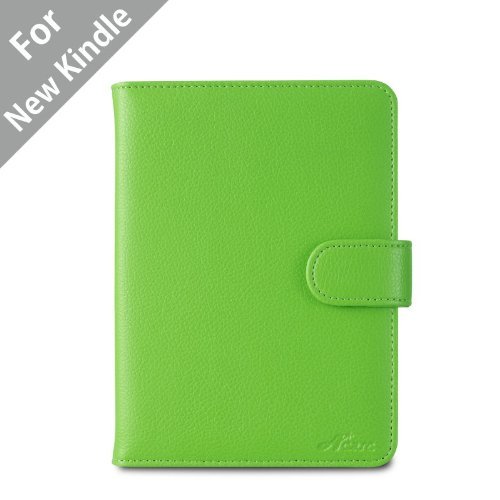
    And if you do end up getting either the Paperwhite or the Touch, I highly recommend this leather case. I got it for my Kindle and it's been great. Easy to open and close, good quality, and the Kindle fits perfectly. It comes in 8 colors and is only $9.45 to $13, so you really can't go wrong. With it on, I can just throw my Kindle in my purse and go without worrying about the screen getting scratched.

    Well, I hope you've enjoyed the series this week on e-readers and e-books. Let me know what you liked about the series and what you didn't :).

    I'd also love to hear about your experiences with e-readers and e-books. Do you have any tips or suggestions? Leave them in the comments.